Suggestions
Suggestions is an inbox of recommended actions, computed from the assets you already hold. It is a reading list, not a rule engine: nothing here changes a record until you press the button on the card.
- For
- An inbox of recommended actions computed from the assets you already hold.
- Will not
- It does not run in the background, notify you, or act on its own. Dismissals last only for the session, because the cross means not now, not never.
- Writes
- Applying a card writes the change to the asset, attributed to you, and records it in that machine’s History.
- On iPhone
- The companion iPhone app reads the same register but does not generate its own recommendations.
What you are looking at
A single column of cards. Each one names a machine, says what is wrong with it, and offers the fix.
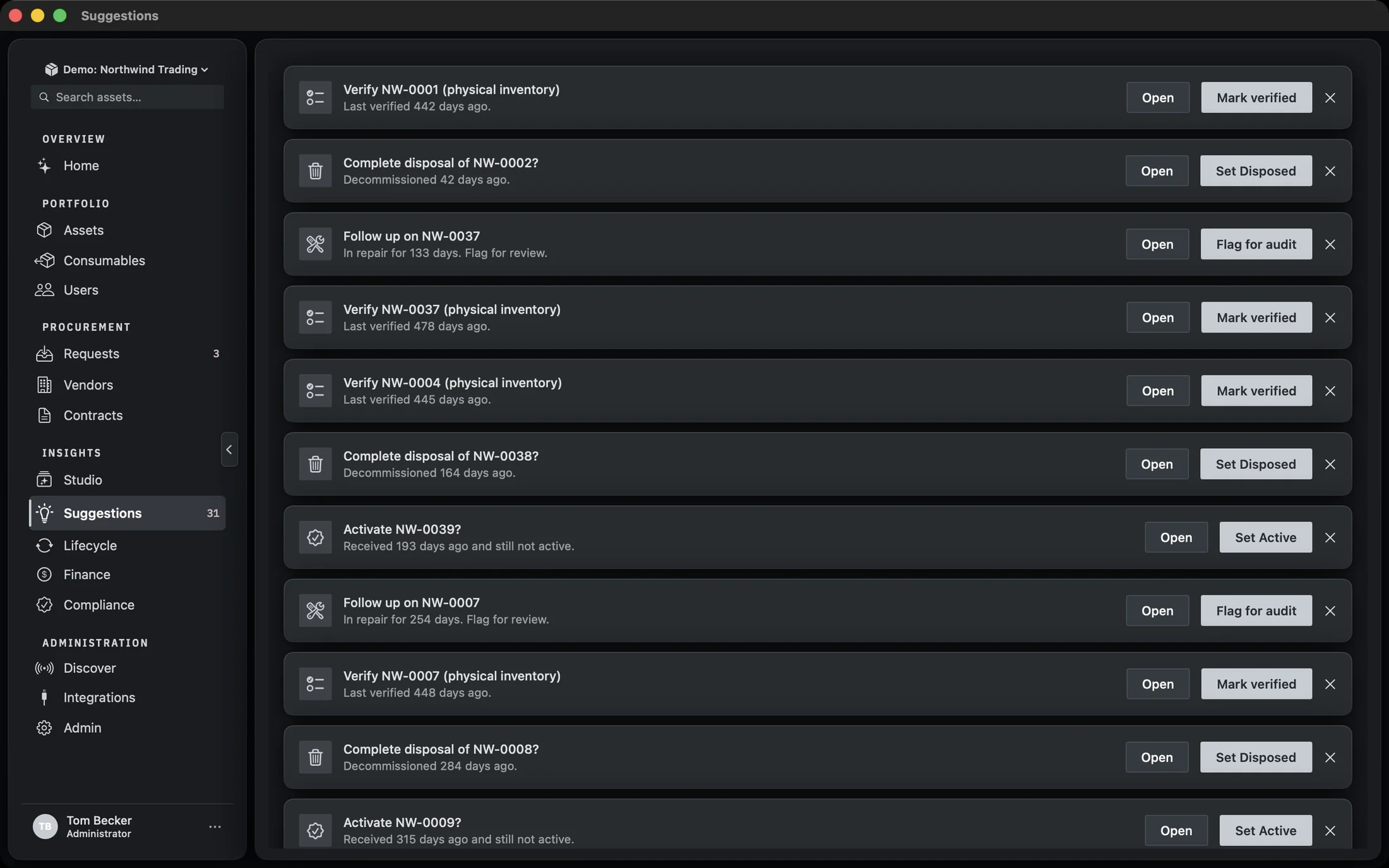
There is no filter bar, no saved views and no column set here. The list is short by design, and the order is the engine’s, not yours. If you want to work the register rather than the recommendations, that is the Assets screen.
Each card is built from four parts. The icon tile on the left is the kind of problem. The title is the headline. The detail line underneath says which asset and why. Then the controls, right-aligned: Open, the action button, and a cross to dismiss.
When there is nothing to do
An empty inbox is the intended state, and it says so rather than showing a blank pane.
With no recommendations outstanding, the screen reads You’re all caught up under a sparkles icon, with the line Recommended actions show up here as your inventory needs attention. That is the whole empty state. There is nothing to configure to reach it.
Suggestions are computed when the screen loads, from the assets in the register at that moment. If the inbox is empty and you believe it should not be, the answer is usually in the asset records themselves rather than in this screen: a machine with no audit date, or a status that already matches what the engine would suggest.
What a card can do
Four actions exist. Which one a card offers depends on what it found, and one kind of card offers no action at all.
- Set Active, Set Disposed, and the rest. The card writes a new status onto the asset and records you as the actor in its history.
- Flag for audit. Sets the asset’s audit flag, which is the same flag the register uses elsewhere.
- Mark verified. Records a physical verification against the asset, stamped with your name.
- Open. Some cards are observations rather than fixes. They carry Open and nothing else, because there is no single correct change to make on your behalf.
The action button takes its label from the suggestion itself, so it reads as the thing it will do rather than a generic Apply. Pressing it runs the change, writes the audit entry, and reloads the list, which is why the card you just dealt with disappears rather than sitting there ticked.

Applying one
The button is the whole interaction. There is no confirmation sheet, because the change is small and reversible from the asset record.
Read the detail line
It names the asset and the reason. If the reason is not one you agree with, use Open instead and change the record by hand.
Press the action button
The change is written to the asset, attributed to you, and the list reloads.
If it fails, read the alert
A failed write raises an Action failed alert with the underlying message and a single OK. The card stays where it was so you can try again or open the asset.
Applying a suggestion is an ordinary edit. It goes through the same repository as a change made on the asset record, so it appears in that machine’s History with your name against it. Nothing about this screen is a side channel.
Dismissing
The cross on the right of a card removes it from the list. It does not remove the condition.
Dismissals last for the session. Quit and reopen Manifest, or load the screen again after the app has been running, and a suggestion that is still valid comes back. That is deliberate: the cross means “not now”, not “never”, and there is no persistent ignore list to maintain or to forget you created.
If you want a recommendation to stop appearing for good, change the underlying fact. Set the status, record the audit, or adjust the asset so the condition no longer holds. The engine reads the register, so the register is where you argue with it.
Where the recommendations come from
One engine, run over every asset in the register, on load.
The engine is given the full asset list and one setting: the physical inventory cadence, taken from Settings. That cadence is what decides whether a machine that has not been seen for a while counts as overdue, so changing the policy changes the inbox without anything else being touched.
Everything else it needs is already on the asset: status, audit flag, last verified date, assignment. There is no separate rules file, no schedule and no background job. The list you see is the list as of the moment the screen loaded.
Because the engine runs on load rather than on a timer, a suggestion can be stale by the time you read it if somebody else changed the asset in between. Applying it re-reads the asset first, so you are not writing over a change you have not seen.
What this screen is not
Three things people expect from a recommendations inbox that Manifest does not do.
- It does not run in the background. Nothing is computed until you open the screen.
- It does not notify you. There is no badge, no alert and no email from this area. The count exists for the sidebar; the decision to look is yours.
- It does not act on its own. Every change on this screen is a button press, attributed to a person.
The companion iPhone app reads the same register, so a machine you fix here is fixed there too. What it does not do is generate its own recommendations.