Starkive StudioStarkive PDF for Windows
Opened in a sandbox. Edited like a real PDF app.
- No network · no file access
- Scripts never run
- Annotate · fill · redact · OCR
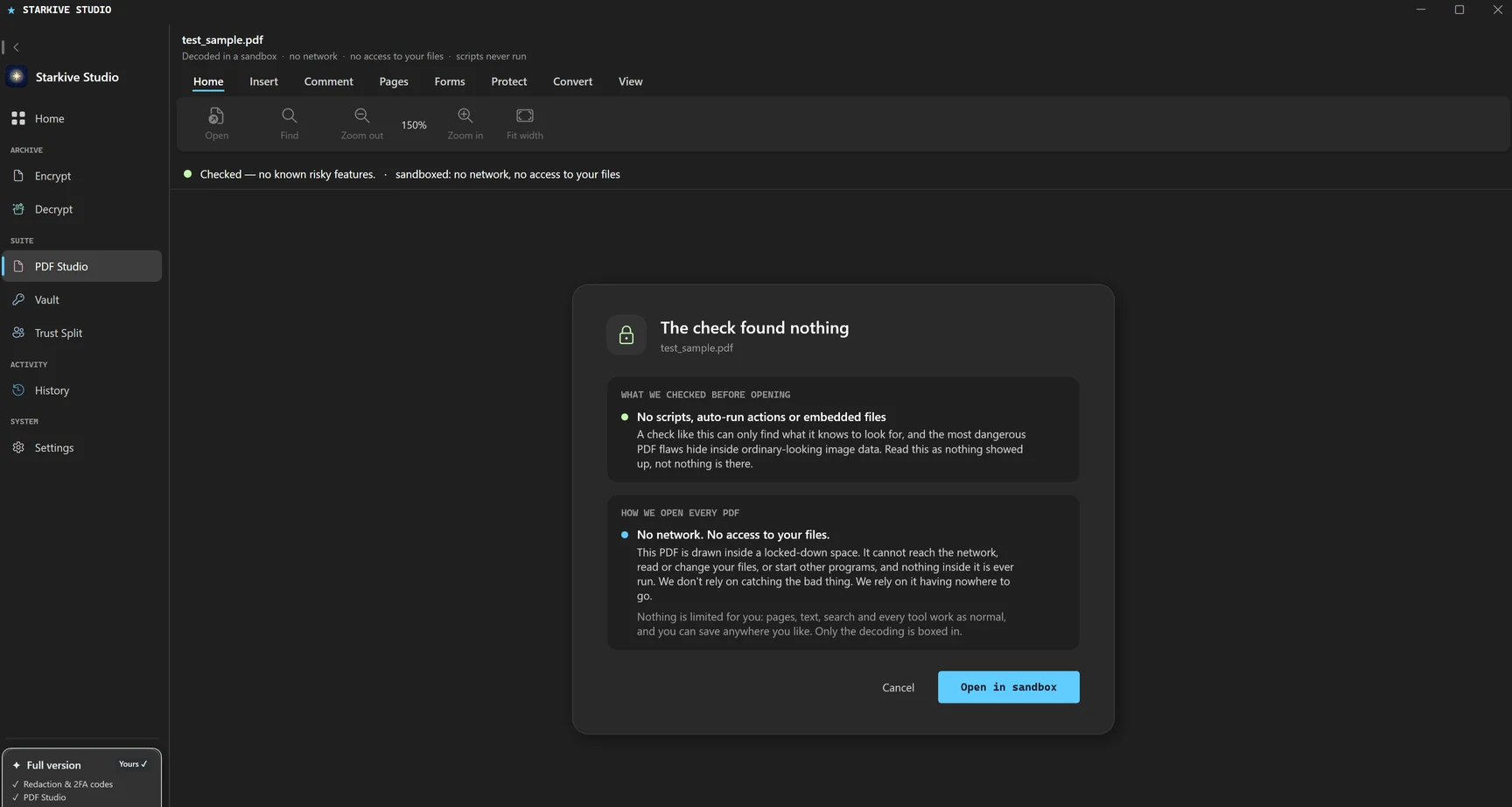
A PDF is a program format, and opening one is where most of the risk in a document workflow actually sits. Starkive decodes every file in a separate process that cannot reach the network, read your files or start anything. Above that line it behaves like the desktop editor you already know.
Opening, reading, searching, annotating and filling in a PDF are free. The one-time unlock is for keeping the result, writing the file out. One payment, no per-file charge and no page limit.
What it does.
- 01
Every file opens in a sandbox
The part of the app that decodes a PDF runs as a separate process with no capabilities at all. It cannot open a socket, reach your files, or start another program. A hostile document is contained rather than trusted.
- 02
Nothing inside the document runs
Starkive never starts the JavaScript or action machinery a PDF can carry. Scripts, auto-run actions and launch actions are not blocked after the fact; they are never begun.
- 03
A report before you open it
Starkive inspects the file first and tells you what is in it: scripts, embedded files, auto-run actions and external links. It reads inside compressed streams and through hex-obfuscated names. It is a transparency report, not a verdict.
- 04
Comment and annotate
Highlight, underline, strike through, draw and leave notes. They are written as real PDF annotations, so every other reader shows them.
- 05
Fill in forms
Type into text fields, tick boxes, choose from dropdowns and pick radio options. Values are written into the form properly, so it stays a form.
- 06
Redaction that removes content
Mark what should go and Starkive deletes it from the file rather than covering it up.
- 07
Make a scan searchable
Recognise the words on a scanned page with the engine built into Windows, and add an invisible text layer. The page looks identical and becomes searchable, selectable and copyable.
- 08
Clean up what you cannot see
Strip metadata, embedded files, scripts and auto-run actions from a copy: the things that travel with a document without ever showing on a page.
- 09
And the ordinary work
Sign, password-protect, merge, split, reorder, rotate, watermark, number pages, pull the text out, and convert to Word.
Containment is not detection
Starkive does not claim to spot a malicious PDF, and the check it runs before opening one cannot tell you a file is safe, only what showed up. The protection is structural instead: the decoder has no network to reach, no files to read and nothing it will execute, so a document that tries something has nowhere to go. That is a smaller promise than most security marketing makes, and it is one we can actually keep.
The others come with it.
One app, one $1.99 unlock. These are not add-ons and there is no upgrade path between them — you either have Studio or you do not.
Starkive Archive
Lock a file with age, OpenPGP or a password ZIP, pack folders into 7-Zip, and open 13 archive formats. It scans for secrets before you seal, and it is free.
Starkive PDF
On the Mac: ask your PDF anything with on-device AI, mark up, fill and sign, redact for real, merge, split and convert. 45 tools in one window, and your files never leave your Mac.
Starkive Vault
One master password you choose, never stored and never sent. Every record is sealed on your own machine, so there is no account to breach, and any backup you turn on is encrypted before it leaves.
Redaction
Mark the words you want removed and Starkive deletes the content underneath rather than painting a rectangle over it. It runs on your machine and writes a new file, so your original is never touched.
Authenticator
Keep your two-factor secrets next to the passwords they protect. Codes are generated on your device to the TOTP standard, sealed by the same Argon2id and AES-256 vault, and unlocked with Windows Hello or Touch ID.
Trust Split
Break a passphrase, recovery phrase or exported key into shares using Shamir's Secret Sharing. You choose how many shares exist and how many are needed to rebuild it; anything fewer reveals nothing at all. It runs entirely on your machine.
Back to Starkive Studio, or see both products.