DocumentationiPhone
Handing one over
Somebody worked off the iPhone for a quarter and has now bought a Mac. This is how the register they built on the phone gets to the Mac, and what happens to the phone afterwards.
- For
- Move a register built on the iPhone across to a Mac, and see what the Mac does with it.
- Will not
- Photographs do not travel with the register; they queue and upload one at a time, and nothing else can send them. Keep the phone paired until the queue is empty.
- Writes
- Nothing is written on the Mac until somebody there accepts the offer; the phone only offers and cannot tell accepted from declined or expired.
The situation this exists for
Pairing a phone to a Mac normally means the phone works from the Mac's register. If the phone is the one holding the register, that is backwards.
Pairing a fresh Mac to a phone that has been in use makes the device holding the register the satellite of the device holding nothing. Before this screen existed there was no way to move the work across: the phone could not push, and the Mac had nothing to pull from. Send to the Mac is the way out of that.
It is on the iPhone, not the Mac, under Settings (the gear at the top of Home). The person who did the work is the one holding the phone, so the button is where they are. The row shows up when a Mac running Starkive is on your Wi-Fi and this phone holds assets of its own.
The move, end to end
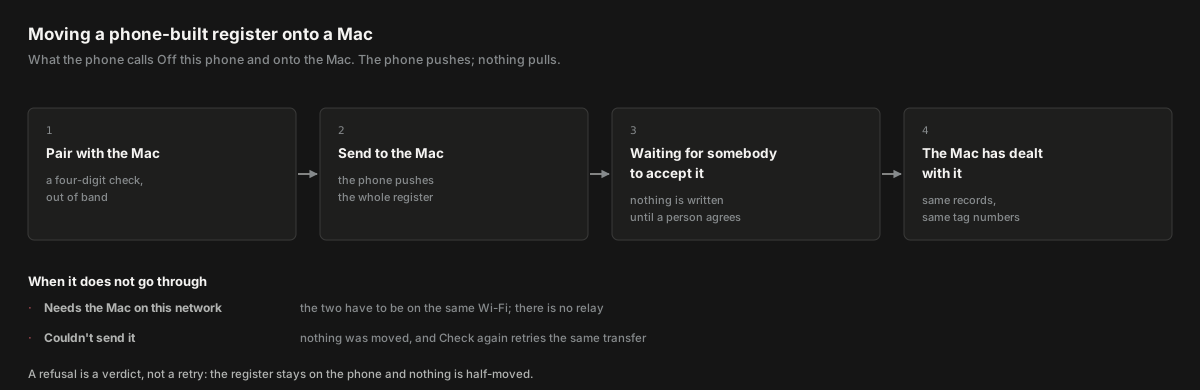
Four steps, and the two ways it stops.
The destination is not a question
The Mac is named on the screen. You are not asked which one.
The two devices already share a cert-pinned channel whose fingerprint was compared out of band when they paired. That is stronger authentication than any file you could carry between them, so re-asking “which Mac?” would be asking you to re-answer something you already proved. The screen says your Mac by name, or your Mac as a fallback when nothing is paired yet.
What will happen
The first thing on the screen is a plain account of the transfer, before any button is pressed.
The bundle is the register: assets, and the sites, people, vendors and agreements around them. The screen states the count of assets so you know what you are sending before you send it.
Sending removes nothing from this iPhone. That sentence is on the screen because it is the thing somebody hesitating over the button is actually worried about. Everything else on this page is detail.
Nothing is written until somebody at the Mac accepts it. The phone offers; the Mac decides. That is the second sentence worth reading before you press anything.
Photographs do not travel with it
This is the part of the screen that is easiest to misread, so it is stated in its own paragraph.
Photographs stay on the phone. They go up on their own, one at a time, as the phone gets a connection. A Mac that has taken the register holds records describing pictures it does not yet have, and the queue is what closes that gap.
Keep the phone paired until the queue is empty. Nothing else can send the photographs. There is no Mac-to-phone pull anywhere in the product: the phone pushes, and nothing else moves a file. If you unpair before the queue drains, the pictures stay on the phone and the Mac has records without them.
If this iPhone has not met a Mac yet
The screen is reachable before there is a Mac to reach, and the way to get one is on it.
When nothing is paired, a Pair with the Mac row appears above the send button, with the detail This iPhone hasn’t met a Mac yet. Pair first, then hand the register over. It opens the pairing sheet in place.
This matters because a phone-first operator who has never paired can be sent here by a refusal elsewhere telling them to hand over first. If pairing lived three screens away in Settings, that person would arrive at a dead end. It does not.
Sending it
One button, and a state that tells you what the Mac is doing with it.
Press Send it
The detail line under the button tells you which path you are on: Goes straight to [Mac name] over Wi-Fi. when the Mac is on this network, Pair with the Mac first. when nothing is paired, or Needs the Mac on this network. when a Mac is paired but not reachable. The button is disabled unless the connection is up.
The Mac is offered the register
The screen changes to With [Mac name] now, with a row reading Waiting for somebody to accept it and a summary of what was offered.
Somebody at the Mac decides
You can close the screen. It does not stop the offer. Check again asks the Mac where it got to, and the row updates with the answer.
The transfer id is stored, not held in memory. If you back out of the screen, to move nearer the Mac or to check something, and come back, the same offer is resumed rather than a second one opened. Backing out of a slow transfer is not an edge case; it is what people do when a transfer looks slow.
When the Mac has dealt with it
The screen stops claiming to know which way it went, because from the phone it cannot.
The phone knows only that the offer is no longer waiting. Accepted, declined and expired look the same from here, and the screen says so rather than inventing an outcome. The Mac reports what it did to the person standing at it.
Your register is still on the iPhone, exactly as it was. If the Mac now holds it too, pair with the Mac in Settings and this phone works from the Mac’s register.
The name that goes into the audit trail
On setup's name step, the name you type is shown as it will appear in the record.
Every record you make carries your name into the audit trail, and it is the first thing an auditor reads. Setup doesn’t ask you to take that on trust: under Your name, a card headed In the audit trail shows an example entry.
Before you type, the actor line reads Nobody yet in the faint ink, and the entry would be unsigned. As you type, the name fills in. The shape is the same one the history sheet draws: the actor line, the right-hand stamp, the tracked field legend, and the struck-through old value.
The preview is a facsimile, not an invention. It uses the same tokens as the real history row, so it will not drift the first time the real row changes. VoiceOver reads it as one element and says it is an example, so nobody stops on it believing an entry already exists.