DocumentationiPhone
Working offline
The iPhone app is built for a technician in a basement with no signal. Captures queue on the phone, drain when a route appears, and the screens say exactly what is still held rather than what you would like to be true.
- For
- Shows what the iPhone app holds, sends and refuses while it has no network.
- Will not
- It will not send a capture in the clear, upload under a retired key, re-send a transfer the OS is still carrying, or claim a file arrived when only the bytes did.
- Writes
- It queues captures on the phone and sends them to the register when it can; the permanent record is the register’s own audit trail.
What offline means here
There are two kinds of offline in this app, and they behave differently.
No route to the register. The phone cannot reach the paired Mac or Starkive Cloud. Captures are accepted, sealed or staged, and queued. Nothing is lost, and nothing is sent until a route exists.
The register is on this phone. It holds its own register, isn’t paired and isn’t signed in to Starkive Cloud. That’s not a fault, it’s where the register lives. Captures are still accepted, but they stay on the phone, kept with their records. Files says kept rather than waiting, because there’s nothing to wait for and a network won’t change that.
The queue is a work list, not a history. Rows that have landed are swept after seven days. The permanent record of a filing is the register’s audit trail, where an auditor can reach it.
The pipeline, drawn
A phone that captures evidence in a basement has to be able to tell you where each file has got to. These are the states it can be in.
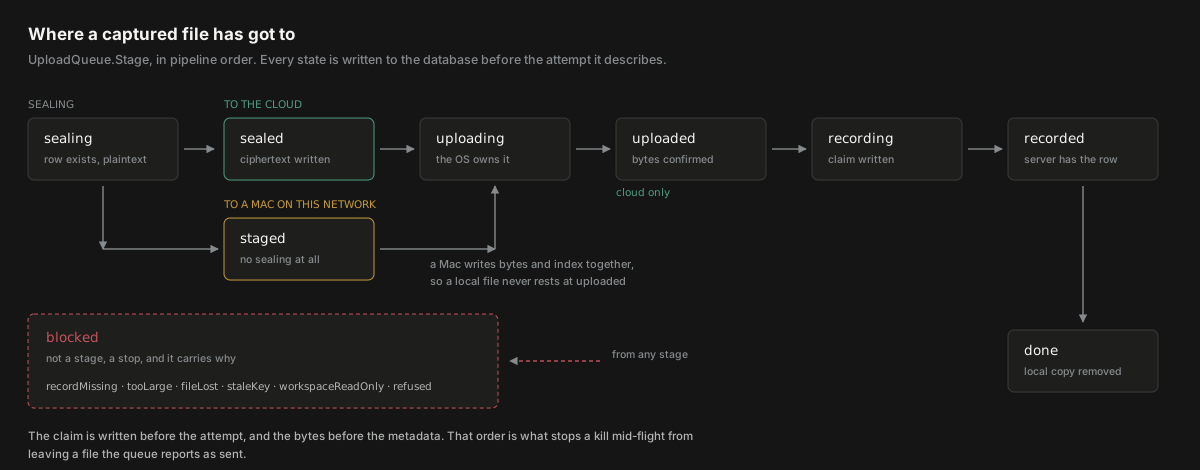
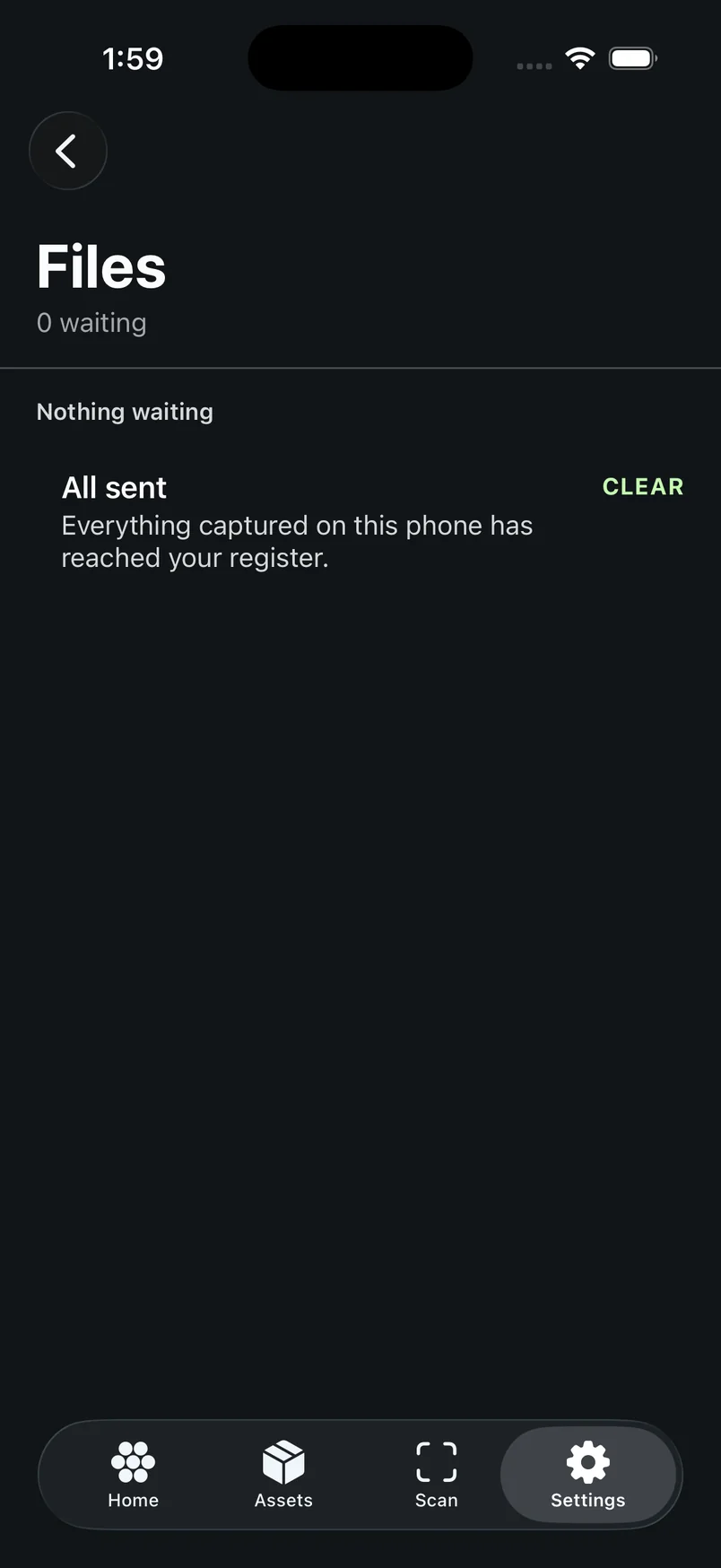
What you actually look at is Settings → Files, from the gear at the top of Home. The diagram above is the machinery; Files is the one screen that answers “has my evidence left the phone?”. On a paired or cloud phone it lists what’s On the way, anything that Needs you, and reads All sent only when everything has arrived. On a phone holding its own register it reads Kept on this iPhone, or Nothing kept yet with Photographs you take are kept with their record on this iPhone.
Where captures live while they wait
Application Support, never Caches, and that is the single most important storage decision in the app.
iOS purges Caches under storage pressure, without warning and without telling the app. A queued file living there would vanish while its row still read Sending and the plaintext had already been deleted: permanent, silent loss of the exact document the system exists to protect. The queue directory is in Application Support instead.
The directory is not excluded from backup. The queue’s index lives in the register database, which rides the backup on a phone that owns its register, and the two have to travel together. Restoring the rows without the bytes leaves every entry blocked as fileLost, which Try again refuses, over a file that is sitting in the gallery. The privacy argument for excluding it was spent twice on the same bytes anyway, because the gallery copy is already in the backup.
The ceiling
A phone with no free space stops being able to take pictures at all. The queue refuses a capture before that happens.
The limit is 750 MB of queued ciphertext. A week underground at forty photographs a day is gigabytes, and the failure mode is not a full queue: it is the system camera failing, other apps crashing, and the technician deleting the app that did it to them. Refusing a capture with an explanation is kinder than being the reason their phone broke.
The refusal names what is held and where these captures actually drain. There are three answers, not two:
- Cloud. “Get on a network and let it clear before capturing more.”
- Paired Mac. “Get within reach of the Mac and let it clear before capturing more.”
- Nowhere. “These stay on this phone until it has somewhere to send them. Discard what you no longer need, or move the register to Starkive Cloud.” A phone that has never seen a Mac gets this one, because a network will not help it.
The count is measured against everything the queue holds, including blocked rows, not just the ones still moving.
What the queue screen tells you
One sentence, drawn from both stores, and it is the only place in the app permitted to conclude that everything has arrived.
The summary is ordered by what you can act on. A stopped file needs you now, a stalled queue explains itself, an unqueued capture is the one that used to be silent, and only when all three are zero does it read All sent.
An earlier version computed this from the queue alone. Nothing pending, nothing blocked, therefore everything has arrived. But an asset the register has not synced yet, a queue that did not exist when the shutter fired, or a file the ceiling refused each leaves a photograph with no queue row at all, invisible to both counts, and the phone reported a clean board over evidence that was still on it. For a product whose output goes to auditors, a confident claim that the evidence is filed is worse than a visible failure.
Waiting for a connection to send captures to. appears when the queue has rows and no sink: signed out, unpaired, or no key. It is not a failed attempt, so nothing is counted against the row, but the screen must not go on saying Sending about a file nothing is carrying. The sentence clears the moment the queue empties.
What happens when the app is woken in the background
iOS relaunches the app to report a finished transfer, and the app has to answer or it gets woken less often.
A background session finishing while the app is dead makes iOS relaunch it and call handleEventsForBackgroundURLSession. An app that does not implement it never learns the transfer landed: the rows stay at Sending, the next launch finds transfers with nothing carrying them, moves them back, and sends the bytes again. A re-upload on every dead-app completion, for the life of the install.
Two hops are needed and neither is optional. UIKit builds the delegate, so it cannot reach the app’s state; the app owns the queue, so it cannot receive the callback. A small rendezvous object holds the handler between them, and the queue registers itself when it exists rather than being handed a reference at a moment that may never come.
Handlers are kept in an array, not a single slot. Two wakes arriving before the queue reports back used to overwrite each other, and iOS counts a handler that never returns as a wake the app failed to use. The symptom is uploads getting slower and slower over the life of the install with nothing visibly broken.
When a transfer stops
The queue distinguishes weather from a verdict, and the difference decides whether you are asked to do anything.
No answer at all is weather. A tunnel, a dead spot, a dropped connection: the row goes back to sendable, an attempt is counted, and it is tried again later. Nothing is shown to you, because there is nothing for you to do.
A refusal is a verdict. The far end answered, and the answer says this will not work by trying again. The row is blocked, the refusal’s own sentence is shown, and the HTTP status is appended so a support question has something to go on. A 401 from the paired Mac reads This Mac no longer recognises this phone. Pair again. rather than a bare number.
The same table serves both halves of a cloud landing: the bytes going up, and the metadata row that files them. A 403 on a revoked device, a 404 for a bucket path that no longer exists, a 402 on a lapsed plan: each blocks with a sentence that names the problem, instead of burning ten attempts pretending to be a dropped connection.
A row that has exhausted its retries blocks with Couldn’t send this after several tries. The retry delay doubles between attempts, so a Mac that is merely asleep does not spend the budget in minutes.
Discarding a capture
The one action whose whole meaning is that the thing stops existing, and it has to actually mean that.
The transfer is cancelled
If the OS is still carrying the bytes, the task is cancelled first. Without this, the upload completed, the Mac filed the photograph against the asset and wrote an audit entry, and the completion came back to a queue with no row and quietly did nothing. A technician who photographed the wrong machine, tapped Discard and read “this can’t be undone” had in fact just filed it.
The files and the row go
Both the sealed copy and the plaintext are removed, and the row is removed rather than blocked. Blocking it left the entry in Needs you for good, pinning the alarm and offering the same Discard button that did the same nothing.
The gallery is told it was discarded, not delivered
A separate callback fires, so the receipt is not set and the green tick reading On the Mac does not appear over a file that was destroyed.
Bytes that already reached the cloud are not removed from here. The storage policy withholds DELETE from clients on purpose: evidence a handset can destroy is evidence an auditor cannot rely on. An object with no row may also belong to a phone that is about to come back and finish the job. Orphans are reported on the Mac and removed by a person, knowing that.
Leaving an organisation
Sign-out throws the whole queue away, and that is the one case where losing a capture is the smaller harm.
Every other removal in the app is per-row, because losing a captured file is what the queue exists to prevent. Sign-out is the exception. A row captured for one organisation and left behind across a sign-out is uploaded into the next organisation’s bucket the moment somebody else signs in: the sink is rebuilt for whoever is signed in now, while the bytes are still sealed under a key that left with the first organisation. The second organisation receives either an attachment nothing can open or, worse, a customer’s evidence that was never theirs.
Sign-out cancels anything in flight, discards every row, and removes the queue directory. It does not fail if there is no session to cancel, because a sign-out that fails on the train is exactly when somebody hands their phone to somebody else.
What the phone will not do
The refusals are the useful part, because each one is a decision somebody made on purpose.
- It will not send a capture in the clear. A file bound for the cloud waits at sealing until the organisation key is available, which it deliberately is not while the phone is locked. A file bound for the paired Mac is not sealed at all, because a local phone holds no organisation key by design; it is staged and sent as the capture itself.
- It will not upload under a retired key. If the organisation re-keyed while the phone was offline, the file is re-sealed under the current generation before it goes. If the phone no longer holds the generation it was sealed under, the row blocks as staleKey rather than putting a document in the cloud nobody can ever read.
- It will not re-send a transfer the OS is still carrying. A row that has been at Sending for more than ten minutes is checked against the session’s live tasks before it is reset. Age alone was a guess, and re-sending a transfer that was still going started a second task, overwrote the identifier the first one would report against, and could block a delivery that had already succeeded.
- It will not claim a file arrived when only the bytes did. A cloud landing is two steps, and the row is only a fact after the metadata write returns. A kill in the window between them is retried on the next foreground rather than read as done.